Showing posts with label AI. Show all posts

Sunday, October 25, 2026

Running a Research Program With an AI Chief of Staff


I have always wanted project management software that could truly help me. Nick and I even recorded a couple of episodes of Not That Kind of Doctor about that search. I never found the holy grail. I always ended up back in my notes app or a notebook, and every few months I had to reboot the whole system. When vibe coding came around, I tried to build my own research tracker. I had a vision of different stages, and AI did produce a few products, but they worked like the older ones. They took quite a bit of work up front and were hard to keep up.

My new solution emerged from AI, but also from my own difficulty. AI pushed me to study it in a variety of ways, and ideas and collaborations multiplied quickly. What had been a minor problem became a major one.

Then I came across the idea of creating an AI Chief of Staff agent. Instead of vibe coding a structure, I simply asked Claude to create a project tracker. I built categories around the funnel from idea to publication. Then I set up a cycle with a Monday morning update on priorities for the week and a Friday prompt for updating what got done.

All of that information lives in a simple .md file written in plain language. Each project stays in a category until it moves forward to the next one, for example from research idea to IRB writing, or from analysis and writing to submitted. I usually work through the AI interface, but occasionally I open the file itself. It is completely readable because it is plain text.

Because the process gave me exactly the support I had been missing for years, I added things that were not strictly research projects in the funnel, at least not originally. The tracker now includes conference proposals, grant proposals, and even plans for the podcasts.

Each project also has a running notes file with next actions and progress updates, so the tracker can actually update itself and flag delays or, in the case of the podcasts, weeks without guests. Without much fanfare, working with this agent has made me considerably more productive while reducing my cognitive load.

What this week looked like

Here is a snapshot from this week. One book came out. Thirteen manuscripts are under review with no decisions. That sounds like progress until you look at the rest of the list.

  • A paper I meant to submit on October 5 now has a new target of October 30.

  • A pilot study has moved its start date three times. It will now run in my class in November because we did not have enough participants.

  • One writing project had shown no movement through eleven review cycles. We set a reboot date of November 12.

  • Another project is pushed to December 1.

  • A journal just asked for another round of revision on a paper I thought was nearly done.

  • One data collection site launched. The other is still waiting on a consent form.

Two new projects also showed up. One is a pilot tied to a grant proposal that was not funded this round. The other is in such an early design phase that my tracker had no category for it, so we created one.
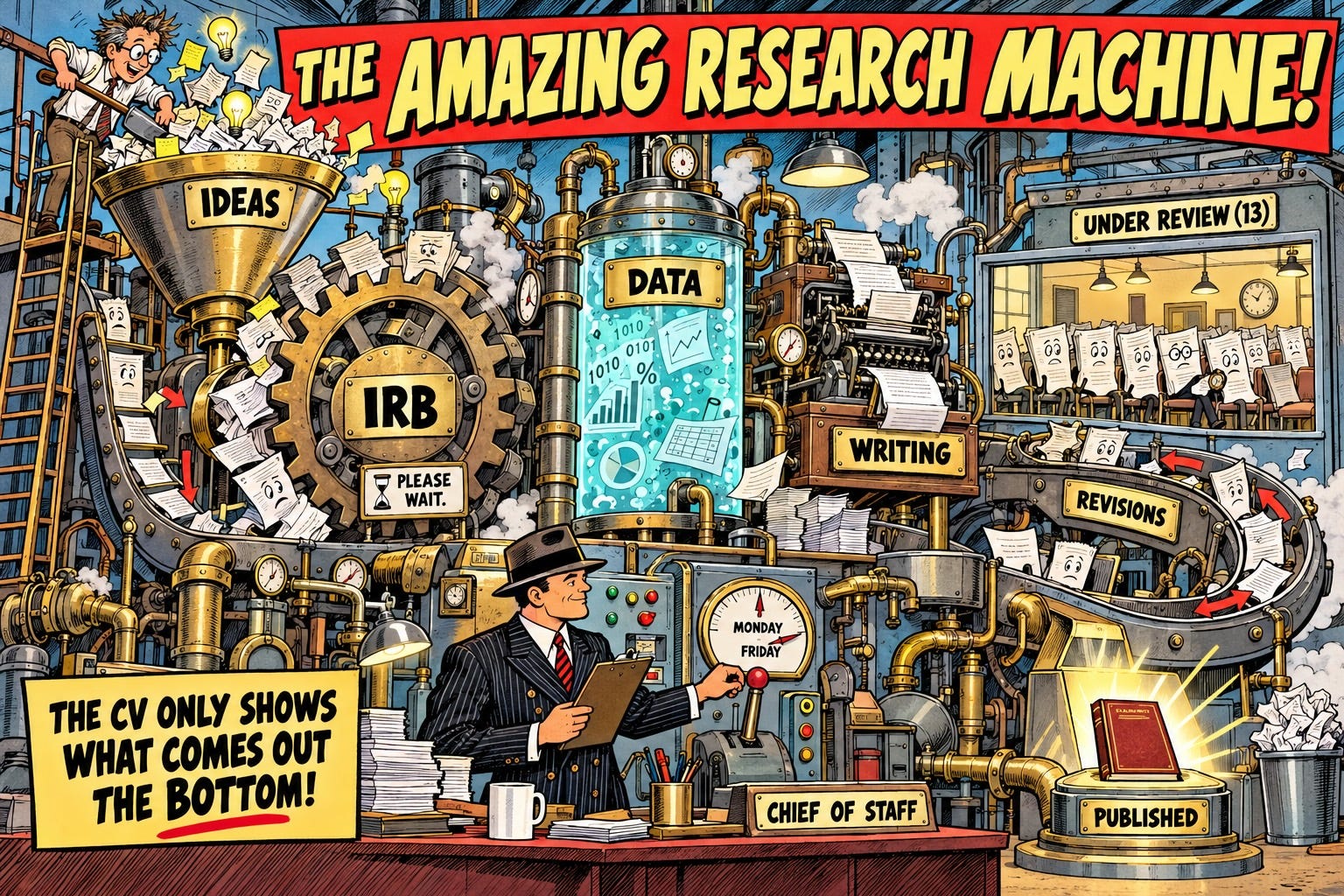
1940s Golden Age comic book panel, horizontal 16:9, aged newsprint with halftone dots, bold black ink outlines, limited palette of brick red, mustard yellow, teal, and cream.  A giant brass research machine with gears, pipes, and puffs of steam. At the top, a wide funnel overflows with papers and light bulbs. Inside the machine, dozens of pages are stuck in gears and piled up waiting. At the bottom, a small chute drops a single shiny book. Beside the machine, an original hero character in a pinstripe suit and fedora calmly holds a clipboard.
Made with ChatGPT 5.6

None of this is unusual. This is what a wide research program looks like from the inside, and it rarely matches the CV, which is always a lagging indicator.

What my Chief of Staff can and cannot do

My agent sets reminders, helps me set priorities, and gets me ready for the next step. My thoughts are more organized and my actions more purposeful. What it cannot do is reduce the friction with the real world. It cannot recruit participants, hurry the IRB, or speed up my grant reviews.

Since I started my project tracker, I stopped using my notes app and notebooks, and I no longer feel the urge to find another productivity app. There is no special maintenance or buildup. I just sit down when I have a few minute and say- let upadte my tracker lets go one category at a time, that's it. Sometimes I do it with a voice interface and sometimes typing but the update is in plain language and with my running notes connected most of it is automatic with me just making sure it is accurate.

What I gain is visibility into both successes and delays. I can see the whole picture while still focusing on one assignment at a time during the work week. The other benefit, for someone like me, is seeing the full scope of the work. I understand what comes next, and I say yes to fewer things. My long list of articles under review gives me pause. Each one will likely come back for revisions at least twice and then become a priority, so I need to make sure I have the bandwidth to handle them. Call it self-regulation with AI.

Sunday, October 18, 2026

The Order Matters More Than the Tool

 Over the past few weeks, I kept seeing the same move in places that have nothing to do with each other.

For the past year, our Design Futures workshop has started the same way. Participants take a piece of paper and sketch a bicycle built for a Nebraska winter. Then they snap a photo of the sketch and ask AI to reproduce it, sometimes from the drawing and sometimes from a written description. By the time AI enters the process, a lot of thinking has already happened. Sometimes the results are fantastic. Sometimes the AI hands back a bike that floats above the pavement, not by intent, but because that is what it perceived.

Last week we interviewed Nick Husbye on the podcast, and he described something curiously similar. Nick asks his preservice teachers to draft a lesson plan by hand. When they have a draft, they let the AI come in and critique the plan. What Nick teaches is that AI can be a very good critic, and that the teacher still has the agency to say, “I hear this critique, but it doesn’t apply here, and here’s why.”

The third example comes from our work with Southeast Community College, where we are asking Writing Center tutors how they work with AI. One tutor described a simple structure they give students.

  1. Start with the rules. Know what your instructor allows so you don’t break them.

  2. Use your own words.

  3. Only then bring in AI to critique, improve, and suggest.

Finally, in Tina Shetabi’s work on using AI in the fashion design process som students reported that starting with AI gave them a strong sense that it is not their work. When they started with their own sketch, they felt more ownership.

Overhead photograph of a wooden desk featuring a pencil sketch of a fat-tire snow bicycle beside a tablet displaying a realistic 3D rendering of the same chainless bicycle floating approximately 10 inches above a snowy mountain trail. A pencil, ruler, coffee cup, and plant surround the designs in soft natural light.
Created with ChatGPT

The pattern

These are four examples from the last few weeks, and there are more. None of these people coordinated. Each one puts human thinking first and AI second, sometimes third. Each treats AI as a critic or collaborator that extends the existing work or points out what isn’t working. The ideas stay thoroughly human. As Nick puts it, AI should amplify your thinking, not export it.

Why the order matters

All four cases involve novices, people entering a domain they are becoming experts in but are at the beginning stages. That might mean designing a bike, writing a lesson plan, drafting a paper in a writing class, or, designing a garment. For novices, the priority is learning the domain and thinking it through.

A while ago I called this the novice problem. Novices are less likely to develop if they start with AI. We want them to start with their own thinking, let AI mirror back what is working and what isn’t, and then iterate. Some of that iteration can happen with AI, but in many cases I want them to go back and iterate with their own thinking.

The novice’s first draft does two things. It gives them something to compare the AI against, and it gives them a sense of ownership.

When students start with AI, they tell us they don’t feel ownership. Their sense of agency is taken away. They often go with whatever the AI made, and they become less and less critical. We want students critical enough to compare what they intended with what is on the page, and to learn from that comparison instead of being replaced by it.

The bikes show how this works. Students asked AI to add cup holders, which is a fine idea. Some kept pushing until the bike had 30 cup holders in ridiculous places. They knew immediately it was funny and implausible. Because AI will go as ridiculous as you ask, stretching it shows students quickly where it doesn’t understand the physics of a working bike or a wearable garment.

That signal leads to metacognition. Even as novices, they are the ones who can evaluate the result, because the work started with their intent.

What this isn’t

This is not an argument against AI. In each case, the AI step adds real value. It also isn’t a universal rule.

The sequence lines up with decisions universities are making about when to bring AI into the curriculum in a more organized way, including the debate in computer science education about when and how much to introduce it. In most of our interviews with professors and students, both groups say the same thing. In entry-level classes, AI makes little sense as the creator. It becomes a crutch because it is too good, and students build up cognitive debt. Once learners move past that stage, the roles can shift. They need to learn how to use AI when they’re stuck, when they lack ideas, or when they need to do research. There are times when AI should go first.

What schools can do

Most AI policies, in K-12 and higher ed, focus on which tools are allowed and what counts as acceptable use. That’s fine. Many policies also leave a lot of agency to instructors, which is great, but instructors still need a framework to work from.

The better question is about sequence. What do students do, and in what order? The answer depends on how novice they are and how much expertise they bring. This changes the policy conversation. A tool can be allowed at one point in the process and not another, with a different intent at each stage.

A human sketches the bike, drafts the paper, or designs the garment. Then AI comes into play, because we can iterate much faster with it. We can ask for small changes or big ones, extend the thinking, or get a critique. Everything is judged against the original intent. That keeps the learner in control, even as a novice, and keeps the product connected to the person who created it.

Three practices make this work.

Model it yourself. Nick models his own failures with AI, and I try to do the same. I show what I used and where it didn’t work. That gives students permission to critique AI without rejecting all of it. It isn’t all in or all out. Sometimes I dump what the AI produces. Sometimes I’m amazed. Usually I’m somewhere in the middle. And sometimes I say out loud, “This isn’t very good. I prefer what I made myself, and I’m not sure AI was worth using here.”

Make comparison the assignment. Ask students to compare their intent with the final product and explain what they learned from the critique. That metacognitive move is where much of the learning happens.

Grade the comparison. If your students respond to grades, put significant weight here. AI output quality varies, so grading only the product partly grades the AI. Grading the comparison grades the thinking.

Where have you seen it work?

Nick’s advice to his students is simple. Write first. Use AI, but use it a little later.

These are observations from all of us grappling with how to teach in the age of AI. So my question is if you seen this sequence work, and where have you seen it fail?

Sunday, October 11, 2026

Not What I Signed Up For: AI and Learning to Write

 Every technology, every change has unintended consequences on the world. Impacts that in hindsight are obvious but are actually hard to predict. This week I want to think through how teachers of writing are grappling with the impact of student AI use on their teaching life, and why I think the burden should not rest on them alone.

Recently, an acquaintance (who may be reading these words) admitted that after many years of teaching language and writing to English learners in higher education, she decided to retire, much like Victoria Livingstone, partly because of the rise of AI. This rhymes with what I am hearing around me. People are not leaving the profession in droves, but they are frustrated and challenged. What I hear is exhaustion and sometimes dread from the conversations instructors have to have a few times a week with a student who very clearly used AI to produce an assignment.

AI has gotten very good at creating polished texts at a linguistic level far above what a novice writer produces. I am not saying it’s better. I am saying it is smoother and appears more scholarly. Instructors dread two potential outcomes. The first is the defensive “I did not use AI” and the self-righteous indignation that comes with it, emotionally taxing and very unhelpful for learning. The second is the admission of guilt, explaining the stressful situation [time constraints, last-minute debacle, fear of failing, feeling of inadequacy], some true, some augmented, but real. It is followed by apologizing, sometimes heartfelt, always unhelpful for learning.

The refrain I hear is simple. This is not how I want to spend time with students. This is not what I signed up for. It is eating up my time, and if I fall for an AI assignment, I feel stupid. Not because I fell for it, but because I wasted my time giving feedback on a paper written by AI. Instructors hate viewing each successful student with a question mark. On the other hand, they know they cannot let it go. If instructors ignore the use of AI, students will soon tell each other, and the ones not using AI will be pushed to use it so they do not fall behind. If students do not feel valued for their hard-earned effort, they will not make an effort.

So do I foresee a language and writing teacher apocalypse coming? Perhaps. One option is to wait it out, and past innovations may be instructive here. In the last 20 years the rise of digital platforms and curricula (mainly K-12) pushed some teachers to retire or change professions. There was a dip for a while, and we came out of it with a new generation of teachers who take the platforms for granted.

A second option is that AI companies and institutions provide the kind of detection that reduces the need for policing and conversations. Each assignment would arrive with a message that evaluates the probability it is AI. The rise of Pangram and watermarking in the models helps that along. Detection will never be perfect, and false positives carry real costs, especially for English learners. Still, institutional detection moves the burden off the instructor and returns it to the level of concern we had before AI, because plagiarism and cheating were always part of the landscape.

In Abundance, Klein and Thompson argue that as a society we overemphasize the risks of action and underemphasize the costs of inaction. Waiting it out is inaction, and its cost is a generation of experienced instructors. I am calling on institutions to start acting and not leave it to overworked and underpaid instructors who are just trying to make it to next week with feedback that leads to better thinking and better writing. Their exhaustion is one of those unintended consequences, and it is no longer hard to predict.